 Relic
Guide
Why old photos turn yellow, red or purple
Old photos change color because the image itself slowly changes. In black-and-white prints, the fine silver that forms the picture reacts with damp air and with chemicals left over from processing, which can turn it yellow, red-brown or purplish. In color prints, the three dyes fade at different speeds, so the color that fades least takes over. The print usually can't be changed back, but a digital copy can be corrected. Here's what each color most likely means, and what to do about it.
Before and after
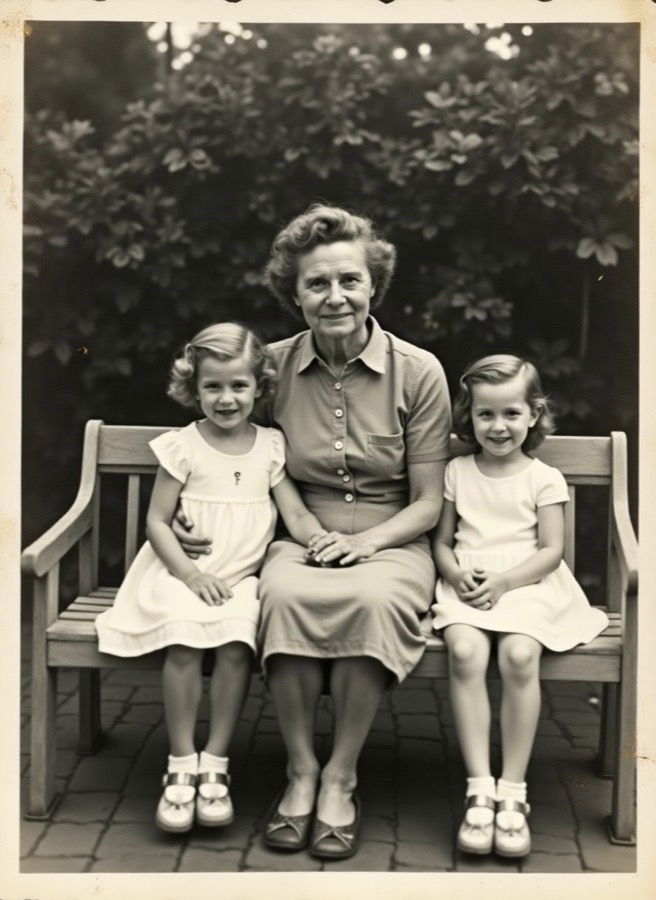
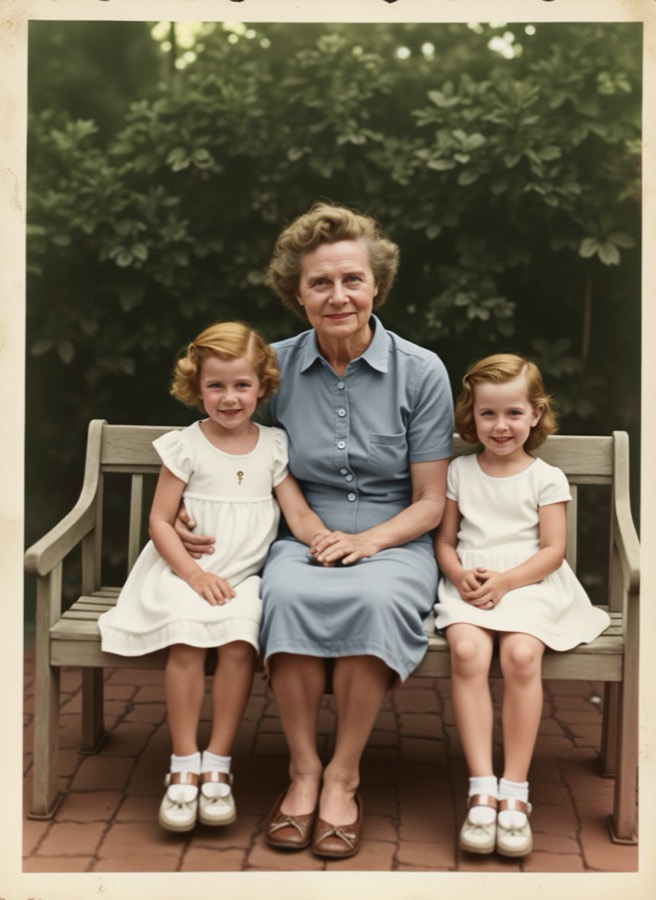
Yellow or yellow-orange (black-and-white print)
Humidity is the most likely cause. Damp air changes the size and shape of the image silver, and the picture takes on a yellow tone. Heat and air pollution speed this up.
What to do: On the copy, correct the white balance first, then bring back contrast. Keep the original in a cool, dry place. How to store old photos safely
Red-brown (black-and-white print)
A redder, darker brown often points to processing chemicals (thiosulfate, or 'hypo') that weren't fully washed out when the print was made. In a lab study, poorly washed prints turned redder while well-washed ones turned yellower.
What to do: You can't tell the cause for sure by eye, so treat both the same way: fix the copy and don't wash or treat the original yourself.
Purple or magenta
In a color print, it usually means the cyan and yellow dyes have faded more than the magenta dye. In a black-and-white print, the same lab study found poorly washed prints kept in very damp air looked purplish.
What to do: On the copy, pull the color back toward neutral: check a white shirt or a gray wall and adjust until it looks white or gray.
Red or orange (color print)
Color photo dyes fade even in the dark, and heat and damp make it faster. When the cyan dye is the one that has faded most, the picture leans red or orange.
What to do: Reduce the red cast on the copy, then adjust contrast. Small changes look more natural than one big one.
Blue or green (color print)
The opposite case: if more of the magenta or yellow dye has faded, what's left leans green or blue.
What to do: Use the same method: find something that should be white or gray and correct toward it.
Yellow borders and white areas
In color prints, the white areas can turn yellow in storage, separate from the picture fading. Old self-adhesive albums and other materials that aren't photo-safe can cause yellowing too.
What to do: Move loose photos into photo-safe sleeves. On the copy, the borders can simply be cropped or cleaned up. Photo-safe storage checklist
A shiny, silvery sheen
A mirror-like sheen at the edges or in dark areas of a black-and-white print is called silver mirroring. It's a sign that the image silver has changed over time.
What to do: Photograph the print at a slight angle, with soft light and no flash, so the sheen doesn't show in the copy. How to scan old photos with your phone
Can the print be changed back?
Usually not. Conservators consider it impossible to chemically restore faded color photographs, so the goal is to slow further change: cool, dry, dark storage.
What to do: For a valuable or unusual print, ask a photo conservator before trying anything on the original.
Fix the color on a copy
Scan the print or photograph it flat in daylight, then correct it in this order: white balance, contrast, then saturation.
What to do: Or let Relic do it: add a phone photo of the print, choose 'Faded or yellowed', and keep black and white or add natural color. Check the result before you print it. Restore a yellowed photo with Relic
Bring your old photos back. Add one old photo and get it back restored in full resolution, ready to print.
Restore my photoQuestions
Can yellowed photos be restored?
The yellowed print itself usually can't be changed back, but a scan or phone photo of it can be corrected: neutral white balance, then contrast. Keep the original in a cool, dry, dark place so it doesn't change further.
Why do old photos turn red?
In color prints, most likely because the cyan dye has faded more than the others. In black-and-white prints, a red-brown tone often points to processing chemicals that weren't fully washed out.
Why do old photos turn purple?
In color prints, usually because the cyan and yellow dyes have faded more than the magenta. Black-and-white prints with leftover processing chemicals can also look purplish after years in damp air.
Does sunlight make photos turn yellow?
Light fades color prints, and heat and humidity speed up yellowing and fading in both color and black-and-white prints. Display a copy and keep the original out of direct sun.
Sources
- Moon and Curran, Heritage Science (2017): image silver and the yellowing of silver gelatine photographs
- Canadian Conservation Institute: Care of Colour Photographic Materials
- Hagley Library: Deterioration of Chromogenic Color Prints
- Library of Congress: Care, Handling and Storage of Photographs
More from Relic
Updated October 29, 2026